✅ Check
The check command verifies that the Fetch Client database files are accessible and that all required data files exist.
Running this command is a quick way to confirm that Fetch Client CLI is correctly configured before executing requests, folders, or collections.
It is especially useful when:
- Setting up Fetch Client CLI for the first time
- Configuring a custom data path/workspace path
- Troubleshooting missing data
- Running Fetch Client CLI in CI/CD pipelines
💻 Syntax
fc-cli check
🔍 What Does It Check?
The command verifies that all required Fetch Client data files are available.
This includes files used to store:
- Collections
- Requests
- Variables
- Cookies
- Request History
If any required file is missing or inaccessible, the CLI reports the issue.
📝 Example
Run the check command.
fc-cli check
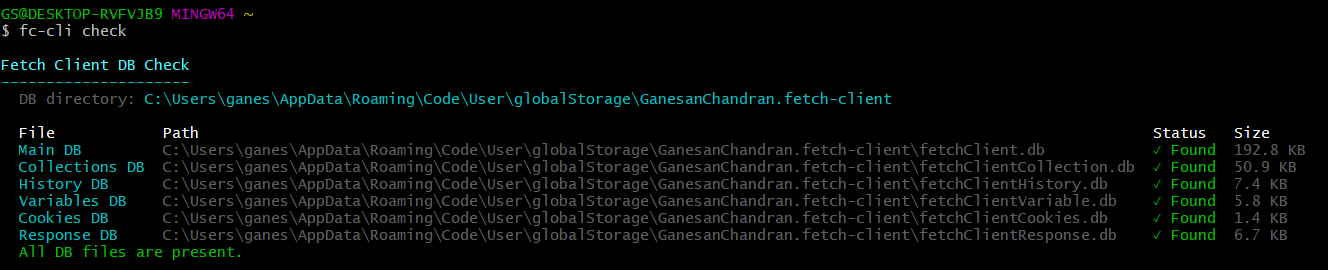
All required data files are available.
❌ Missing Files
If one or more required files are missing, the CLI reports the affected files.
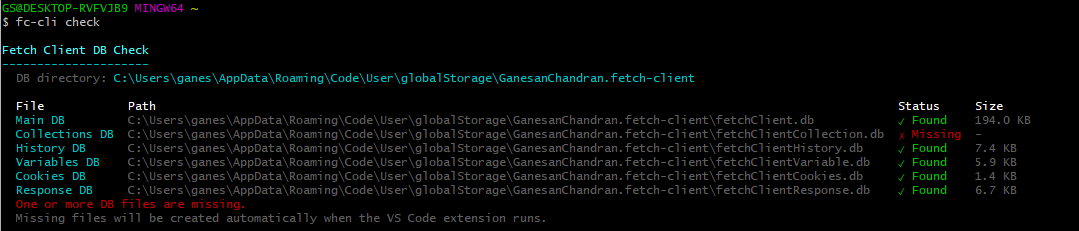
Check completed with errors.
Review the reported files before running additional commands.
💡 Common Uses
- Verify Installation - After installing Fetch Client CLI, verify that it can access the Fetch Client data directory.
- Verify a Custom Data Directory - If you configured the
FC_DB_PATHenvironment variable, run: - Before Running Automation - Use the command as a validation step before executing requests.
🛠️ Troubleshooting
📂 Data Directory Not Found
Ensure that the Fetch Client data directory exists.
If you're using a custom location, verify that FC_DB_PATH points to the correct directory.
📄 Missing Data Files
If required files are missing:
- Open the Fetch Client VS Code extension and confirm your data is available.
- Restore the missing files from a backup if applicable.
- Verify that the data directory is complete.
🔒 Permission Denied
If the CLI cannot access the data directory:
- Verify that your user account has read permission.
- Ensure the directory is not locked by another application.
- On Linux or macOS, confirm the directory permissions.
If fc-cli check completes successfully, your Fetch Client data directory is ready for use with all CLI commands.