▶️ Run
The run command executes requests stored in your Fetch Client data directory. Depending on the options you use, you can run:
- A single request
- Every request in a folder
- Every request in a collection
- Every request in every collection
- A raw cURL command
While it runs, Fetch Client CLI automatically:
- Resolves variables
- Runs any configured Pre-Requests
- Sends the HTTP request
- Runs Tests
- Shows the result
- Generates reports (optional)
💻 Syntax
fc-cli run [options]
⚙️ Options
| Option | What it does |
|---|---|
--req | Run a request |
--fol | Run a folder |
--col | Run a collection |
--curl | Run a raw cURL command |
--name | Find the resource by name |
--id | Find the resource by ID |
--all | Run every collection/folder |
--var-id | Override the Variable Set by id |
--var-name | Override the Variable Set by name |
--export | Export the run results |
--export-path | Folder where reports get saved |
The CLI supports a simplified syntax where names or IDs can be passed directly after --req, --fol, --col, and --var.
For example:
fc-cli run --req "Get Users"
fc-cli run --col "Regression Tests"
fc-cli run --var "QA Variables"
The legacy options (--name and --id) are still fully supported for backward compatibility.
📖 Run Commands
| Action | Preferred command | Legacy command |
|---|---|---|
| Run a request by name | fc-cli run --req "Get Users" | fc-cli run --req --name "Get Users" |
| Run a request by ID | fc-cli run --req <request-id> | fc-cli run --req --id <request-id> |
| Run a folder by name | fc-cli run --fol "Authentication" | fc-cli run --fol --name "Authentication" |
| Run a folder by ID | fc-cli run --fol <folder-id> | fc-cli run --fol --id <folder-id> |
| Run a collection by name | fc-cli run --col "Regression Tests" | fc-cli run --col --name "Regression Tests" |
| Run a collection by ID | fc-cli run --col <collection-id> | fc-cli run --col --id <collection-id> |
| Run every collection | fc-cli run --col --all | Same |
| Run an exported collection | fc-cli run --file collection.json | Same |
| Run a folder from an exported collection | fc-cli run --file collection.json --fol "Authentication" | fc-cli run --file collection.json --fol --name "Authentication" |
| Run a folder by ID from an exported collection | fc-cli run --file collection.json --fol <folder-id> | fc-cli run --file collection.json --fol --id <folder-id> |
| Run a request from an exported collection | fc-cli run --file collection.json --req "Login" | fc-cli run --file collection.json --req --name "Login" |
| Run a request by ID from an exported collection | fc-cli run --file collection.json --req <request-id> | fc-cli run --file collection.json --req --id <request-id> |
| Override variables for an exported collection | fc-cli run --file collection.json --var-file variables.json | Same |
| Run a raw cURL command | fc-cli run --curl "curl https://api.example.com/users" | Same |
| Override Variable Set by name | fc-cli run --req "Login" --var "QA Variables" | fc-cli run --req --name "Login" --var-name "QA Variables" |
| Override Variable Set by ID | fc-cli run --req "Login" --var <variable-set-id> | fc-cli run --req --name "Login" --var-id <variable-set-id> |
| Export an HTML report | fc-cli run --col "Regression Tests" --export html | fc-cli run --col --name "Regression Tests" --export html |
| Export a JSON report | fc-cli run --col "Regression Tests" --export json | fc-cli run --col --name "Regression Tests" --export json |
| Export an XML report | fc-cli run --col --all --export xml | Same |
| Export to a custom folder | fc-cli run --col --all --export json --export-path "./reports" | Same |
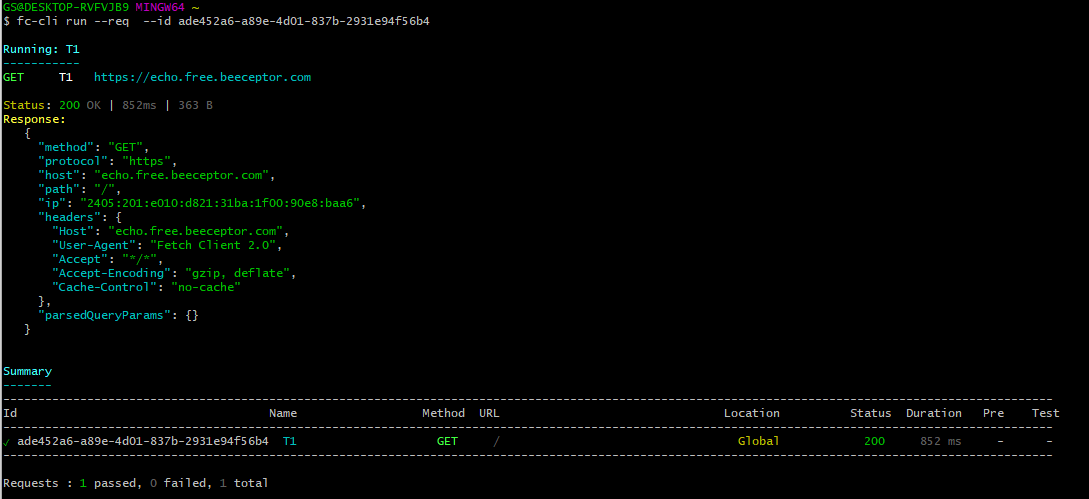
📨 Run a Request
Run a single request by name or ID.
| Action | Preferred | Legacy (still supported) |
|---|---|---|
| Run by name | fc-cli run --req "Get Users" | fc-cli run --req --name "Get Users" |
| Run by ID | fc-cli run --req <request-id> | fc-cli run --req --id <request-id> |
📂 Run a Folder
Run every request in a folder.
| Action | Preferred | Legacy (still supported) |
|---|---|---|
| Run by name | fc-cli run --fol "Authentication" | fc-cli run --fol --name "Authentication" |
| Run by ID | fc-cli run --fol <folder-id> | fc-cli run --fol --id <folder-id> |
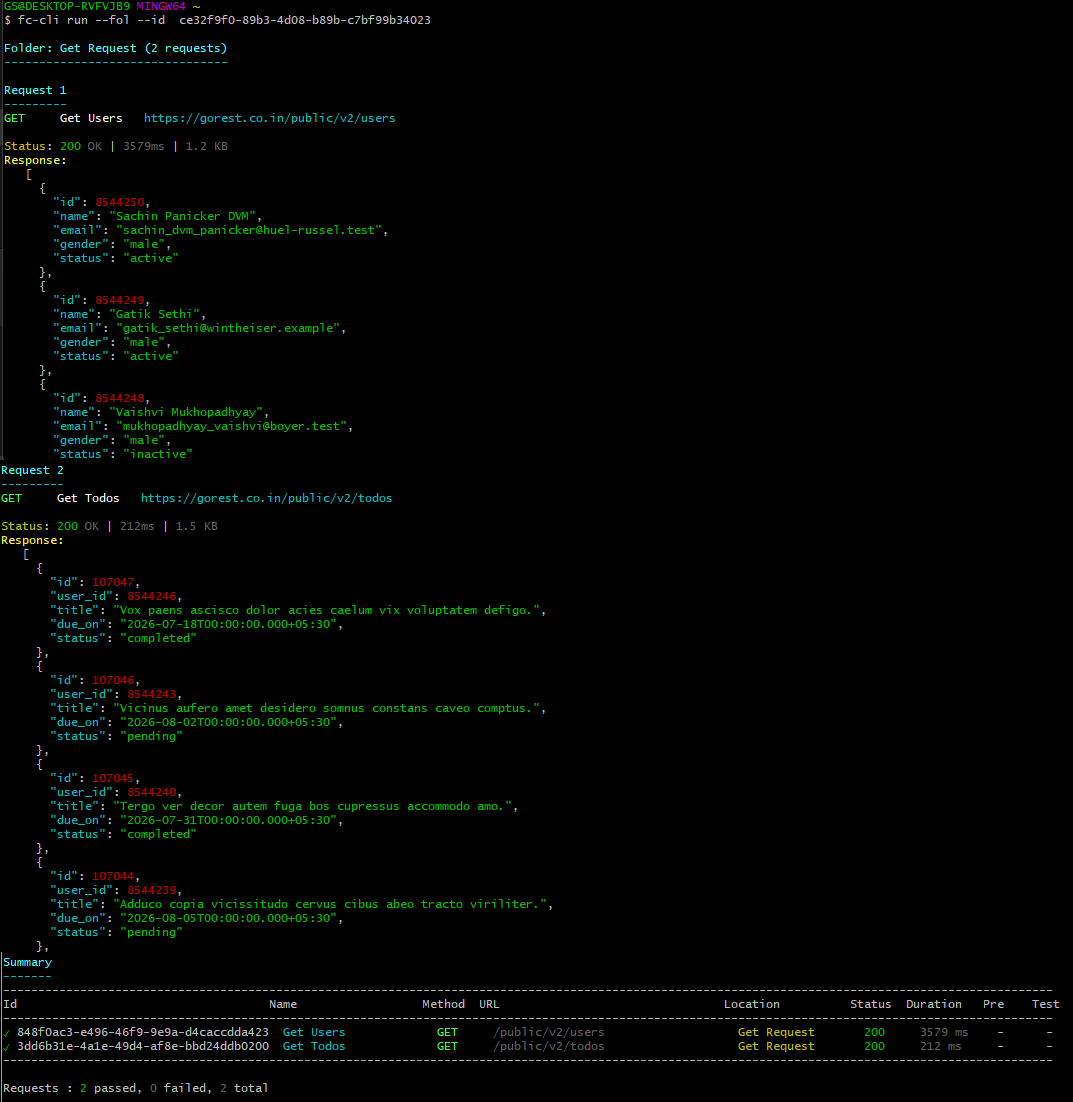
Requests run sequentially, in the same order they appear in the Fetch Client extension.
📚 Run a Collection
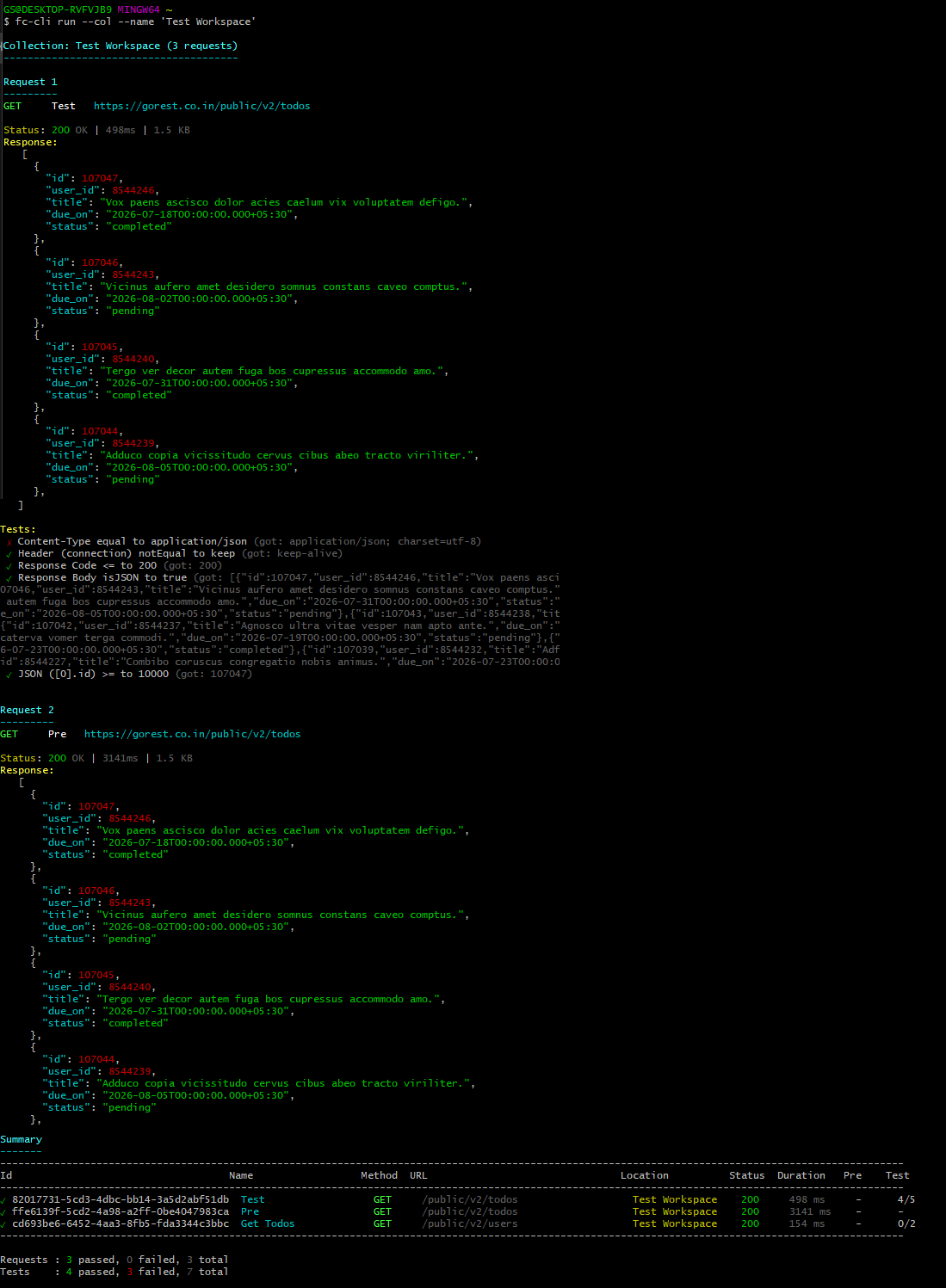
Run every request in a collection.
| Action | Preferred | Legacy (still supported) |
|---|---|---|
| Run by name | fc-cli run --col "Regression Tests" | fc-cli run --col --name "Regression Tests" |
| Run by ID | fc-cli run --col <collection-id> | fc-cli run --col --id <collection-id> |
🚀 Run All Collections
Run every request across every collection.
fc-cli run --col --all
📦 Run an Exported Collection
Fetch Client CLI can execute an exported collection JSON file directly.
This mode does not require the Fetch Client database or the VS Code extension. Simply share the exported collection and run it anywhere the CLI is installed.
Running an exported collection is completely self-contained.
- ✅ No Fetch Client database required
- ✅ No VS Code extension required
- ✅ Perfect for CI/CD pipelines
- ✅ Easy to share with teammates
- ✅ Great for running APIs on build agents or remote machines
Collection
fc-cli run --file collection.json
Folder
| Action | Preferred | Legacy (still supported) |
|---|---|---|
| Run by name | fc-cli run --file collection.json --fol "Authentication" | fc-cli run --file collection.json --fol --name "Authentication" |
| Run by ID | fc-cli run --file collection.json --fol <folder-id> | fc-cli run --file collection.json --fol --id <folder-id> |
Request
| Action | Preferred | Legacy (still supported) |
|---|---|---|
| Run by name | fc-cli run --file collection.json --req "Login" | fc-cli run --file collection.json --req --name "Login" |
| Run by ID | fc-cli run --file collection.json --req <request-id> | fc-cli run --file collection.json --req --id <request-id> |
Override Variables
Replace the embedded variables using another exported Variable Set.
| Action | Command |
|---|---|
| Override collection variables | fc-cli run --file collection.json --var-file variables.json |
| Override folder variables | fc-cli run --file collection.json --fol "Authentication" --var-file variables.json |
| Override request variables | fc-cli run --file collection.json --req "Login" --var-file variables.json |
When using --file, the CLI loads everything from the exported files.
Database-based options such as --var, --var-id, and --var-name are not supported. Use --var-file instead.
🌐 Run a Raw cURL Command
Run a raw cURL command without importing it into Fetch Client first.
fc-cli run --curl "curl https://api.example.com/users"
🔄 Override the Variable Set
By default, requests use the Variable Set linked to the collection. You can temporarily override it when running a request, folder, or collection.
Request
| Action | Preferred | Legacy (still supported) |
|---|---|---|
| Variable Set by name | fc-cli run --req "Login" --var "QA Variables" | fc-cli run --req --name "Login" --var-name "QA Variables" |
| Variable Set by ID | fc-cli run --req "Login" --var <variable-set-id> | fc-cli run --req --name "Login" --var-id <variable-set-id> |
Folder
| Action | Preferred | Legacy (still supported) |
|---|---|---|
| Variable Set by name | fc-cli run --fol "Authentication" --var "QA Variables" | fc-cli run --fol --name "Authentication" --var-name "QA Variables" |
| Variable Set by ID | fc-cli run --fol "Authentication" --var <variable-set-id> | fc-cli run --fol --name "Authentication" --var-id <variable-set-id> |
Collection
| Action | Preferred | Legacy (still supported) |
|---|---|---|
| Variable Set by name | fc-cli run --col "Regression Tests" --var "QA Variables" | fc-cli run --col --name "Regression Tests" --var-name "QA Variables" |
| Variable Set by ID | fc-cli run --col "Regression Tests" --var <variable-set-id> | fc-cli run --col --name "Regression Tests" --var-id <variable-set-id> |
If a collection already has a linked Variable Set, that linked Variable Set always takes precedence.
In this case, --var, --var-id, and --var-name are ignored, and the CLI displays an informational message.
🔗 Pre-Requests
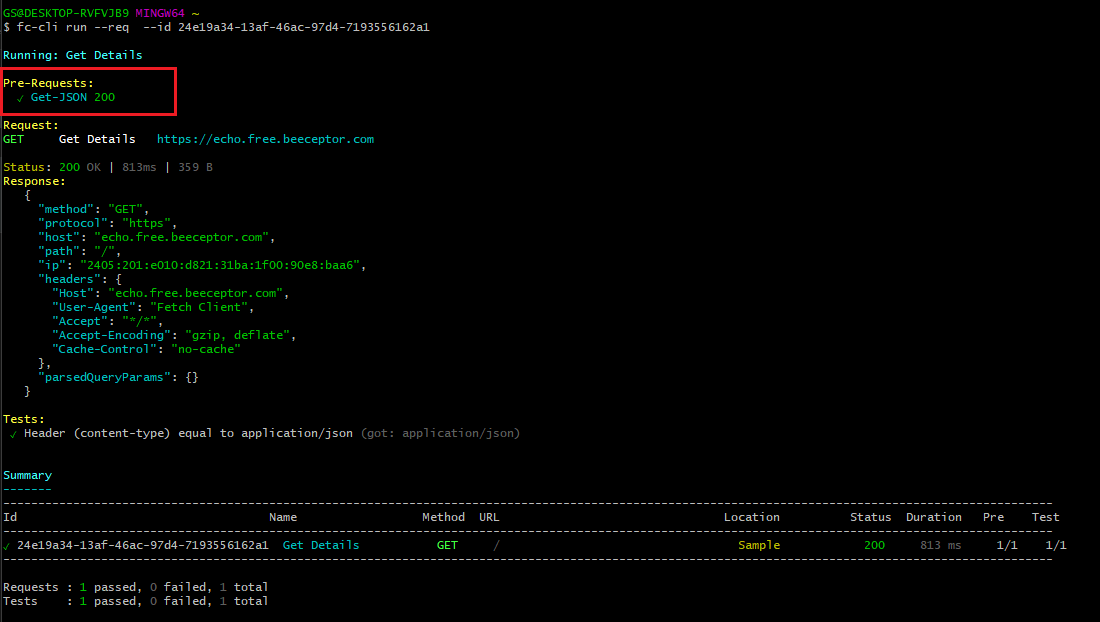
If a request has one or more Pre-Requests configured, Fetch Client CLI executes them automatically before the main request.
Common use cases include:
- Authenticating users
- Generating access tokens
- Preparing test data
- Executing dependent requests
No additional command-line options are required.
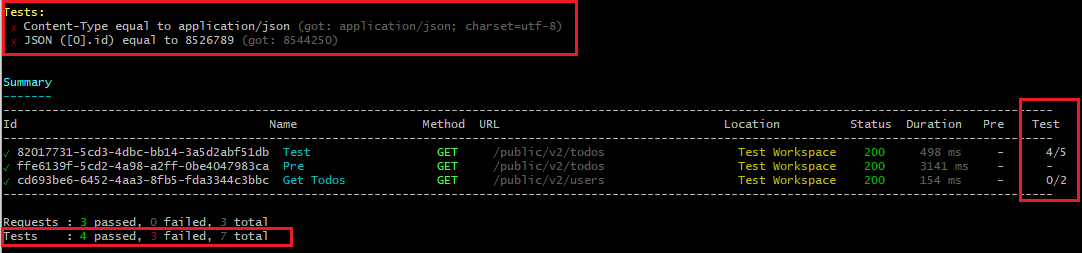
✅ Tests
After each request completes, Fetch Client CLI automatically executes any configured Tests and displays the results.
📊 Export Reports
Use the --export option to generate a report after execution completes.
Supported formats
- HTML
- JSON
- CSV
- XML
- NUnit
Export Examples
| Action | Preferred | Legacy (still supported) |
|---|---|---|
| Export a request report | fc-cli run --req "Login" --export html | fc-cli run --req --name "Login" --export html |
| Export a collection report | fc-cli run --col "Regression Tests" --export json | fc-cli run --col --name "Regression Tests" --export json |
| Export all collections | fc-cli run --col --all --export xml | Same |
| Export an exported collection | fc-cli run --file collection.json --export html | Same |
| Export a folder from an exported collection | fc-cli run --file collection.json --fol "Authentication" --export json | fc-cli run --file collection.json --fol --name "Authentication" --export json |
| Export a request from an exported collection | fc-cli run --file collection.json --req "Login" --export xml | fc-cli run --file collection.json --req --name "Login" --export xml |
📁 Export to a Custom Folder
Use --export-path to specify where reports are saved.
| Action | Command |
|---|---|
| Export all collections | fc-cli run --col --all --export json --export-path "./reports" |
| Export an exported collection | fc-cli run --file collection.json --export html --export-path "./reports" |
--export-path must point to an existing directory.
If omitted, reports are saved to the fetch-client-exports folder located alongside your Fetch Client data directory.
🔄 Backward Compatibility
The simplified syntax is recommended for all new commands and scripts.
For compatibility with existing automation and CI/CD pipelines, the legacy options continue to be fully supported.
| Preferred | Legacy |
|---|---|
--req "Login" | --req --name "Login" |
--req <request-id> | --req --id <request-id> |
--fol "Authentication" | --fol --name "Authentication" |
--fol <folder-id> | --fol --id <folder-id> |
--col "Regression Tests" | --col --name "Regression Tests" |
--col <collection-id> | --col --id <collection-id> |
--var "QA Variables" | --var-name "QA Variables" |
--var <variable-set-id> | --var-id <variable-set-id> |