⚡ Performance Testing
Run load tests against a single request, folder, collection, or exported collection directly from the Fetch Client CLI.
Performance testing simulates multiple concurrent virtual users (VUs) sending requests to your APIs, allowing you to measure response times, throughput, and failure rates under load. Reports can also be exported for later analysis.
💻 Syntax
fc-cli perf [options]
⚙️ Options
| Option | Description |
|---|---|
--req | Load test a request by name or ID |
--fol | Load test a folder by name or ID |
--col | Load test a collection by name or ID |
--file | Load test an exported collection |
--var | Override the Variable Set by name or ID |
--var-file | Override variables for an exported collection |
--load-model | Load model (fixed, duration, rampup, combined) |
--vus | Number of virtual users |
--iterations | Number of iterations (Fixed model only) |
--duration | Test duration in seconds |
--rampup-duration | Ramp-up duration in seconds |
--rampup-steps | Number of ramp-up steps |
--think-time | Delay between request waves |
--export | Export the performance report |
--export-path | Directory where reports are saved |
🎯 Supported Scopes
Performance tests can be executed against:
- A single request
- A folder
- A collection
- An exported collection (
--file)
🚀 Basic usage
| Action | Command |
|---|---|
| Test a request | fc-cli perf --req "Login" |
| Test a request by ID | fc-cli perf --req <request-id> |
| Test a folder | fc-cli perf --fol "Authentication" |
| Test a folder by ID | fc-cli perf --fol <folder-id> |
| Test a collection | fc-cli perf --col "User APIs" |
| Test a collection by ID | fc-cli perf --col <collection-id> |
| Test an exported collection | fc-cli perf --file collection.json |
| Test a folder from an exported collection | fc-cli perf --file collection.json --fol "Authentication" |
| Test a request from an exported collection | fc-cli perf --file collection.json --req "Login" |
| Override the Variable Set | fc-cli perf --col "User APIs" --var "Production" |
| Override variables for an exported collection | fc-cli perf --file collection.json --var-file variables.json |
| Export a report | fc-cli perf --col "User APIs" --export html |
📦 Run an Exported Collection
Fetch Client CLI can execute an exported collection JSON file directly.
This mode does not require the Fetch Client database or the VS Code extension.
Running an exported collection is completely self-contained.
- ✅ No Fetch Client database required
- ✅ No VS Code extension required
- ✅ Perfect for CI/CD pipelines
- ✅ Easy to share with teammates
- ✅ Great for running APIs on build agents or remote machines
🔧 Using variable sets
When running against the Fetch Client database, you can override the variable set.
fc-cli perf --col "User APIs" --var "Production"
If the collection is already linked to a variable set, the linked variable set takes precedence.
When running from an exported collection, use a variable file instead.
fc-cli perf --file collection.json --var-file variables.json
⚙️ Performance options
| Option | Description | Default |
|---|---|---|
--load-model | fixed, duration, rampup, combined | fixed |
--vus | Number of virtual users | 5 |
--iterations | Iterations per virtual user (Fixed only) | 10 |
--duration | Test duration in seconds | 30 |
--rampup-duration | Ramp-up duration in seconds | 20 |
--rampup-steps | Number of ramp steps | 5 |
--think-time | Delay between waves (milliseconds) | 0 |
📈 Load models
Fetch Client CLI supports four load models.
Fixed
Runs a constant number of virtual users for a fixed number of iterations.
fc-cli perf \
  --req Login \
  --load-model fixed \
  --vus 10 \
  --iterations 50
Options
| Option | Description |
|---|---|
--vus | Number of concurrent virtual users |
--iterations | Number of iterations performed by each virtual user |
Use this model when you need repeatable benchmark tests.
Duration
Maintains a constant number of virtual users until the configured duration expires.
fc-cli perf \
  --col "User APIs" \
  --load-model duration \
  --vus 20 \
  --duration 120
Options
| Option | Description |
|---|---|
--vus | Number of concurrent virtual users |
--duration | Test duration in seconds |
Use this model for soak or endurance testing.
Ramp-up
Gradually increases the number of virtual users until the target concurrency is reached.
fc-cli perf \
  --col "User APIs" \
  --load-model rampup \
  --vus 50 \
  --rampup-duration 120 \
  --rampup-steps 10
Options
| Option | Description |
|---|---|
--vus | Target virtual users |
--rampup-duration | Total ramp-up duration in seconds |
--rampup-steps | Number of increments during ramp-up |
Use this model to identify the load level at which performance begins to degrade.
Combined
Gradually ramps up to the target concurrency and then maintains that load for a specified duration.
fc-cli perf \
  --col "User APIs" \
  --load-model combined \
  --vus 50 \
  --rampup-duration 60 \
  --duration 300
Options
| Option | Description |
|---|---|
--vus | Target virtual users |
--rampup-duration | Ramp-up duration |
--rampup-steps | Number of ramp steps |
--duration | Time to maintain peak load |
This model most closely resembles real production traffic patterns.
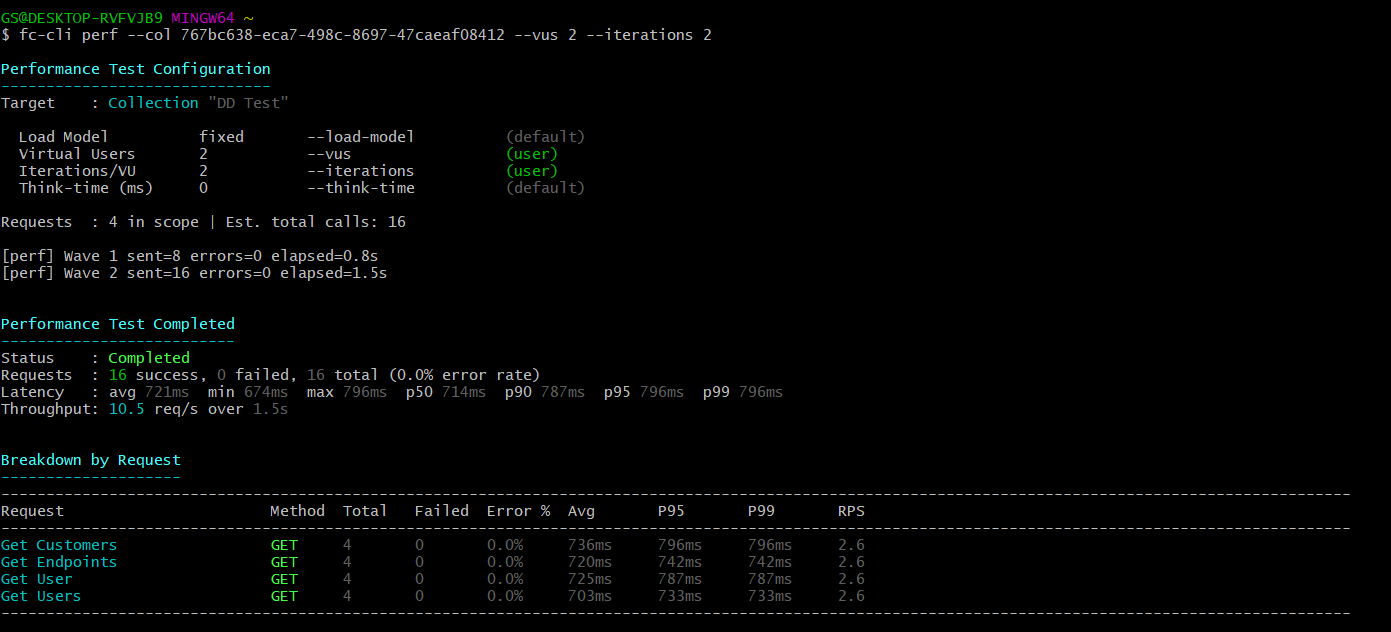
📋 Configuration summary
Before each performance test begins, the CLI prints a summary of the resolved configuration.
The summary includes:
- Test scope
- Load model
- Virtual users
- Iterations or duration
- Think time
- Values supplied by the user
- Default values used automatically
- Warnings for invalid, ignored, or out-of-range options
This helps verify the test configuration before requests are executed.
📤 Exporting reports
Performance reports can be exported after the test completes or is cancelled.
Export JSON
fc-cli perf \
  --col "User APIs" \
  --export json
Export HTML
fc-cli perf \
  --col "User APIs" \
  --export html
Export to a custom directory
fc-cli perf \
  --col "User APIs" \
  --export html \
  --export-path ./reports
Supported export formats
| Format | Description |
|---|---|
| JSON | Complete performance test results |
| CSV | Spreadsheet-friendly summary |
| HTML | Interactive report for sharing |
| XML | Structured report for integrations |
🛑 Gracefully stopping a test
Press Ctrl+C while a test is running.
-
First Ctrl+C
- Stops scheduling new waves.
- Waits for the current wave to finish.
- Prints the final summary.
- Generates export reports if requested.
-
Second Ctrl+C
- Immediately terminates the process.
🚧 Limits
| Setting | Maximum |
|---|---|
| Virtual Users | 50 |
| Iterations | 1000 |
| Test Duration | 3600 seconds |
| Ramp-up Duration | 3600 seconds |
| Think Time | 300000 ms |
💡 Examples
Fixed benchmark
fc-cli perf \
  --req Login \
  --load-model fixed \
  --vus 10 \
  --iterations 100
Stress test an entire collection
fc-cli perf \
  --col "User APIs" \
  --load-model rampup \
  --vus 50 \
  --rampup-duration 120 \
  --rampup-steps 10
Soak test
fc-cli perf \
  --col "User APIs" \
  --load-model duration \
  --vus 25 \
  --duration 600
Production-style load
fc-cli perf \
  --col "User APIs" \
  --load-model combined \
  --vus 50 \
  --rampup-duration 60 \
  --duration 300
Export the report
fc-cli perf \
  --col "User APIs" \
  --load-model fixed \
  --vus 20 \
  --iterations 50 \
  --export html \
  --export-path ./reports
📝 Notes
- Performance tests can be executed directly against the Fetch Client database or an exported collection.
- Variable overrides are supported when running against the database.
- Exported collections use
--var-fileinstead of--var. - Reports can be exported in JSON, CSV, HTML, and XML formats.
- Invalid or unsupported command-line options are validated before the test begins.
- Graceful cancellation preserves all completed results before exiting.