🔬 API Quality Gate
Run an automated Quality Gate check against a single request, folder, collection, or exported collection directly from the Fetch Client CLI.
Each request is scored 0-100 across 7 quality dimensions (Functional, Security, Performance, Design, Observability, Test Coverage, Maintainability) using the same rule engine as the extension's Quality Gate panel, and produces a PASS / CONDITIONAL PASS / FAIL verdict plus a separate CI/CD gate status. qc exits with code 1 whenever that gate fails, so it drops straight into a build pipeline.
💻 Syntax
fc-cli qc [options]
⚙️ Options
| Option | Description |
|---|---|
--req | Quality check a request by name or ID |
--fol | Quality check a folder by name or ID |
--col | Quality check a collection by name or ID |
--col --all | Quality check every collection |
--file | Quality check an exported collection |
--var | Override the Variable Set by name or ID |
--var-file | Override variables for an exported collection |
--rules | List all available quality-gate rules, grouped by dimension |
--config | Path to a .qgrc.json config file (default: .qgrc.json in the current directory, if present) |
--export | Export the quality-gate report (json, csv, html, xml) |
--export-path | Directory where reports are saved |
🎯 Supported scopes
Quality checks can be run against:
- A single request
- A folder
- A collection, or every collection (
--col --all) - An exported collection (
--file)
🚀 Basic usage
| Action | Command |
|---|---|
| Check a request | fc-cli qc --req "Login" |
| Check a request by ID | fc-cli qc --req <request-id> |
| Check a folder | fc-cli qc --fol "Authentication" |
| Check a collection | fc-cli qc --col "User APIs" |
| Check every collection | fc-cli qc --col --all |
| Check an exported collection | fc-cli qc --file collection.json |
| Check a folder from an exported collection | fc-cli qc --file collection.json --fol "Authentication" |
| Check a request from an exported collection | fc-cli qc --file collection.json --req "Login" |
| Override the Variable Set | fc-cli qc --col "User APIs" --var "Production" |
| Override variables for an exported collection | fc-cli qc --file collection.json --var-file variables.json |
| List all rules | fc-cli qc --rules |
| Use a custom config file | fc-cli qc --col "User APIs" --config ./configs/strict.qgrc.json |
| Export a report | fc-cli qc --col "User APIs" --export html |
📦 Run an exported collection
Like run and perf, qc can quality-check an exported collection JSON file directly.
This mode does not require the Fetch Client database or the VS Code extension.
Running a quality check against an exported collection is completely self-contained.
- ✅ No Fetch Client database required
- ✅ No VS Code extension required
- ✅ Perfect for CI/CD pipelines
- ✅ Easy to share with teammates
- ✅ Great for gating merges on build agents or remote machines
🔧 Using variable sets
When running against the Fetch Client database, you can override the variable set:
fc-cli qc --col "User APIs" --var "Production"
If the collection is already linked to a variable set, the linked variable set takes precedence over --var (an info message is printed) - the same priority rule used by run and perf.
When running from an exported collection, use a variable file instead:
fc-cli qc --file collection.json --var-file variables.json
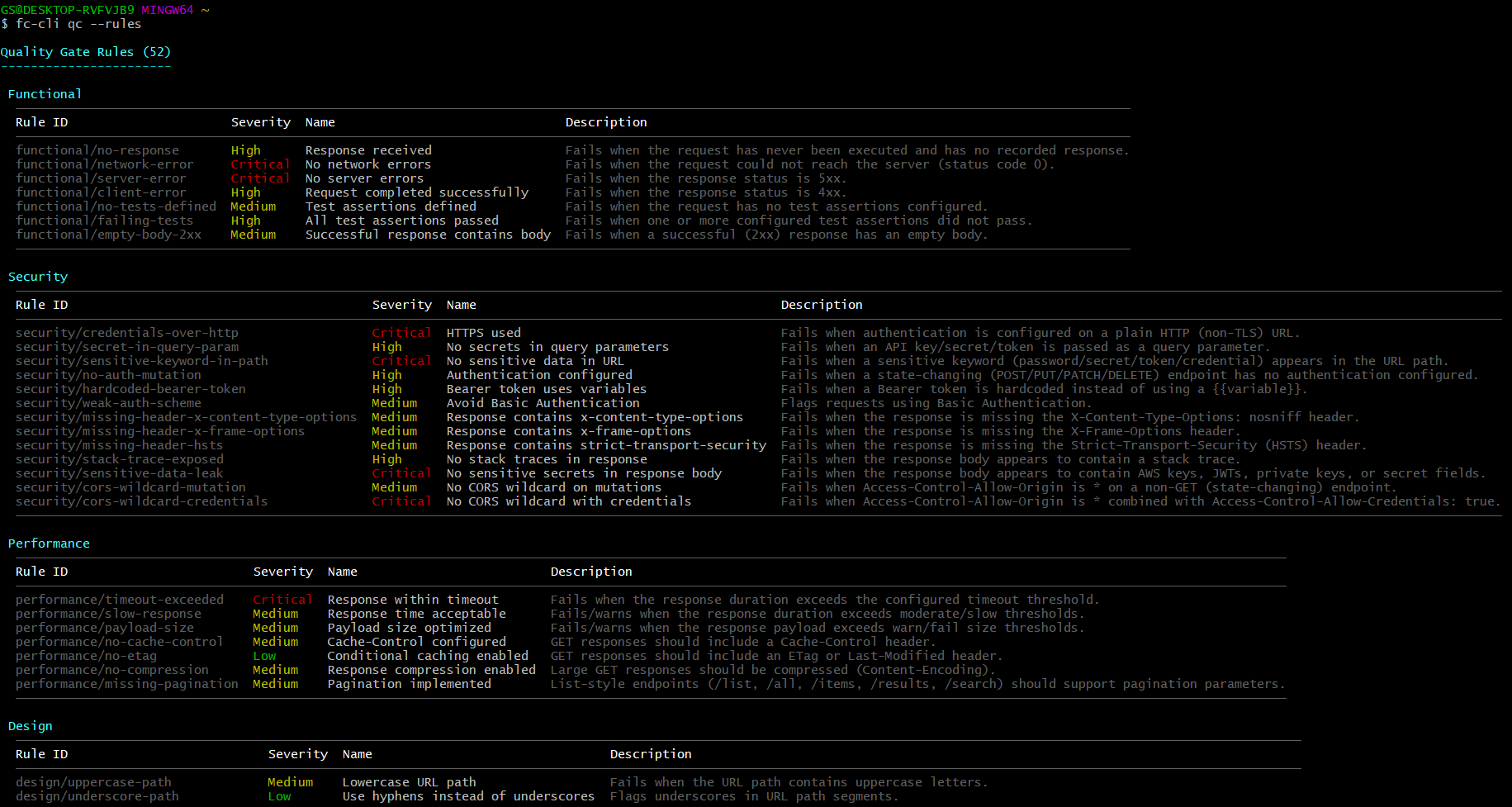
📏 Listing available rules
fc-cli qc --rules
Prints every registered rule, grouped by dimension, with its rule ID, default severity, name, and description:
Quality Gate Rules (52)

 Security
 Rule ID                                Severity   Name                          Description
 security/credentials-over-http         Critical   HTTPS used                    Fails when authentication is configured on a plain HTTP (non-TLS) URL.
 security/no-auth-mutation              High       Authentication configured     Fails when a state-changing endpoint has no authentication configured.
 ...

Disable a rule via .qgrc.json { "disabledRules": ["<ruleId>"] }, or an inline "@qg-disable <ruleId>" tag in a request's Notes.
This is a read-only listing - it doesn't require a scope (--req/--col/--fol/--file) and doesn't run anything.
⚙️ Using a custom config file
By default, qc looks for a .qgrc.json file in the current working directory. Pass --config to point at a different file:
fc-cli qc --col "User APIs" --config ./configs/ci-strict.qgrc.json
- If
--configis omitted and no.qgrc.jsonexists in the current directory,qcruns with default thresholds/weights and no disabled rules. - If
--configis passed explicitly and the file doesn't exist (or can't be parsed),qcprints an error and exits with code1rather than silently falling back to defaults.
See the extension's Quality Gate documentation for the full .qgrc.json schema (thresholds, weights, disabledRules, failOn).
🧪 How each request is evaluated
qc uses the same core runner as the extension's Quality Gate panel (runLiveQualityGateRequest), so behaviour is identical on both surfaces:
- The request's pre-request chain runs first - collection/folder-level, then request-level - and any variable it updates is picked up before the main request fires.
- The main request fires directly; its duration is measured for the Performance dimension.
- Configured test assertions are executed against the live response and used by the Functional and Test Coverage rules.
- Configured set-variable rules run against the live response, same as
fc-cli run.
Every request in scope is checked live on each qc run - there's no "use the last saved response" step like in the extension panel, since the CLI has no persisted-response concept to fall back to.
🖥️ Console output
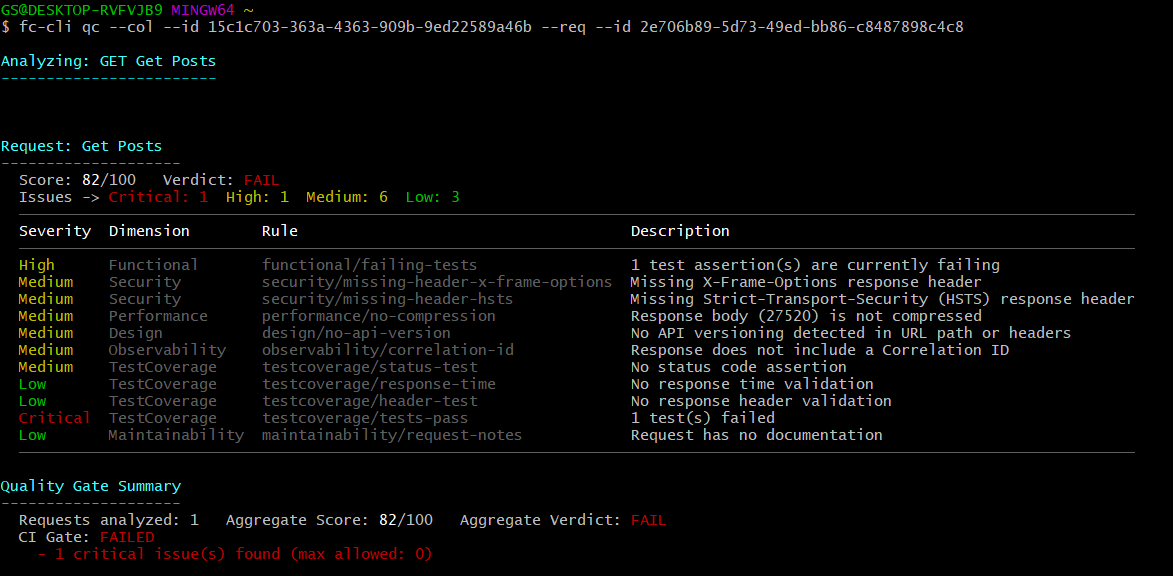
For each request, qc prints its score, verdict, an issue-severity breakdown, and a table of every issue found:
Analyzing: POST /api/users

Request: Create User
  Score: 62/100   Verdict: FAIL
  Issues -> Critical: 1  High: 1  Medium: 2  Low: 0

  Severity   Dimension   Rule                              Description
  Critical   Security    security/sensitive-data-leak      Potential JWT exposed in the response body
  High       Design      design/get-with-body              GET request has a request body
  Medium     Performance performance/no-cache-control       No Cache-Control header on GET response
  Medium     Design      design/no-api-version              No API versioning detected in URL path or headers
After every request in scope has run, a summary is printed:
Quality Gate Summary
  Requests analyzed: 12   Aggregate Score: 78/100   Aggregate Verdict: CONDITIONAL_PASS
  CI Gate: FAILED
    - 1 critical issue(s) found (max allowed: 0)
🚦 Exit codes
qc sets process.exitCode = 1 whenever report.gateStatus.passed is false - i.e. the CI/CD gate failed, independent of the PASS/CONDITIONAL PASS/FAIL verdict shown per request. Use this directly to fail a pipeline step:
fc-cli qc --col "User APIs" --config ./ci.qgrc.json
# example CI step
- name: API Quality Gate
  run: fc-cli qc --col "User APIs" --config ./ci.qgrc.json --export json --export-path ./reports
qc also exits with 1 on usage errors (missing scope, missing name/id, unreadable/invalid --config file, unsupported --export format).
📤 Exporting reports
fc-cli qc --col "User APIs" --export html
fc-cli qc --col "User APIs" --export json --export-path ./reports
| Format | Description |
|---|---|
| JSON | Complete quality-gate report - config used, every dimension/rule/issue, suppressed issues |
| CSV | Summary metrics in a spreadsheet-friendly format |
| HTML | Interactive, shareable report |
| XML | Structured report for integrations |
If --export-path is omitted, reports are written to a fetch-client-exports folder alongside the Fetch Client database (or the current directory, when running from --file).
💡 Examples
Check a single request
fc-cli qc --req "Login"
Check an entire collection with a strict CI config
fc-cli qc --col "User APIs" --config ./ci.qgrc.json
Gate every collection in one run
fc-cli qc --col --all --export json --export-path ./reports
Check a folder inside an exported collection
fc-cli qc --file collection.json --fol "Authentication"
List every rule before deciding what to disable
fc-cli qc --rules
📝 Notes
- Quality checks can be executed directly against the Fetch Client database or an exported collection.
- Every request in scope is run live -
qchas no saved-response fallback, unlike the extension's Quality Gate panel. - Variable overrides are supported when running against the database; exported collections use
--var-fileinstead of--var. - Reports can be exported in JSON, CSV, HTML, and XML formats (no
nunit, unlikerun/dd). - Rules can be disabled workspace-wide via
.qgrc.json(disabledRules), or per-request via an inline@qg-disable <ruleId>tag in the request's Notes. qcexits with code1when the CI/CD gate fails, making it safe to use as a pipeline step.