📋 List
The list command displays collections, folders, and variables stored in the Fetch Client data directory.
It helps you discover available resources before executing other commands such as run.
The list command supports filtering by id or name, making it easy to locate specific resources.
💻 Syntax
fc-cli list [options]
⚙️ Options
| Option | Description |
|---|---|
--col | List collections or find a collection by name or ID |
--fol | List folders or find a folder by name or ID |
--var | List Variable Sets or find a Variable Set by name or ID |
Simplified syntax
The CLI supports a simplified syntax where names or IDs can be passed directly after --col, --fol, and --var.
For example:
fc-cli list --col "Sample"
fc-cli list --fol "Authentication"
fc-cli list --var "QA Variables"
The legacy options (--name and --id) are still fully supported for backward compatibility.
📝 Examples
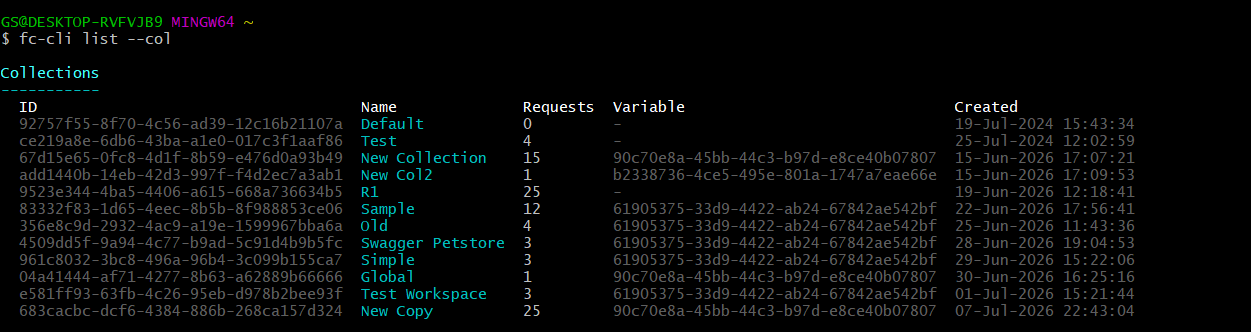
📚 Display All Collections
fc-cli list --col
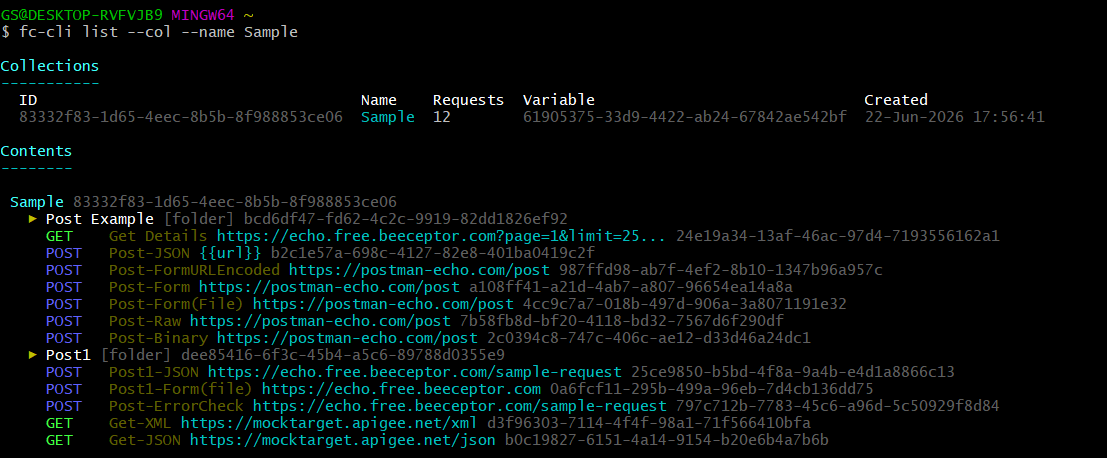
🔎 Find a Collection by Name
Preferred
fc-cli list --col "Sample"
Legacy (still supported)
fc-cli list --col --name "Sample"
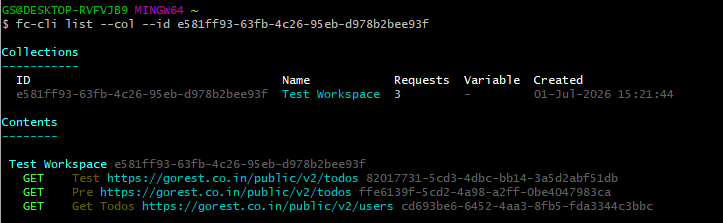
🆔 Find a Collection by ID
Preferred
fc-cli list --col 7f12419c-91c8-44d0-a8e5-cb351dd287e3
Legacy (still supported)
fc-cli list --col --id 7f12419c-91c8-44d0-a8e5-cb351dd287e3
📖 List Commands
| Action | Preferred command | Legacy command |
|---|---|---|
| List all collections | fc-cli list --col | Same |
| Find a collection by name | fc-cli list --col "Sample" | fc-cli list --col --name "Sample" |
| Find a collection by ID | fc-cli list --col <collection-id> | fc-cli list --col --id <collection-id> |
| List all folders | fc-cli list --fol | Same |
| Find a folder by name | fc-cli list --fol "Authentication" | fc-cli list --fol --name "Authentication" |
| Find a folder by ID | fc-cli list --fol <folder-id> | fc-cli list --fol --id <folder-id> |
| List all Variable Sets | fc-cli list --var | Same |
| Find a Variable Set by name | fc-cli list --var "QA Variables" | fc-cli list --var --name "QA Variables" |
| Find a Variable Set by ID | fc-cli list --var <variable-set-id> | fc-cli list --var --id <variable-set-id> |
🔄 Backward Compatibility
The simplified syntax is recommended for all new commands and scripts.
For compatibility with existing automation and CI/CD pipelines, the legacy options continue to be fully supported.
| Preferred | Legacy |
|---|---|
--col "Sample" | --col --name "Sample" |
--col <collection-id> | --col --id <collection-id> |
--fol "Authentication" | --fol --name "Authentication" |
--fol <folder-id> | --fol --id <folder-id> |
--var "QA Variables" | --var --name "QA Variables" |
--var <variable-set-id> | --var --id <variable-set-id> |