Cookies
Fetch Client makes working with HTTP cookies simple and automatic. The extension stores cookies from responses and includes them in future requests, just like a web browser does.
🍪 Cookie Features
Fetch Client provides several ways to manage cookies in your API testing workflow:
View Stored Cookies
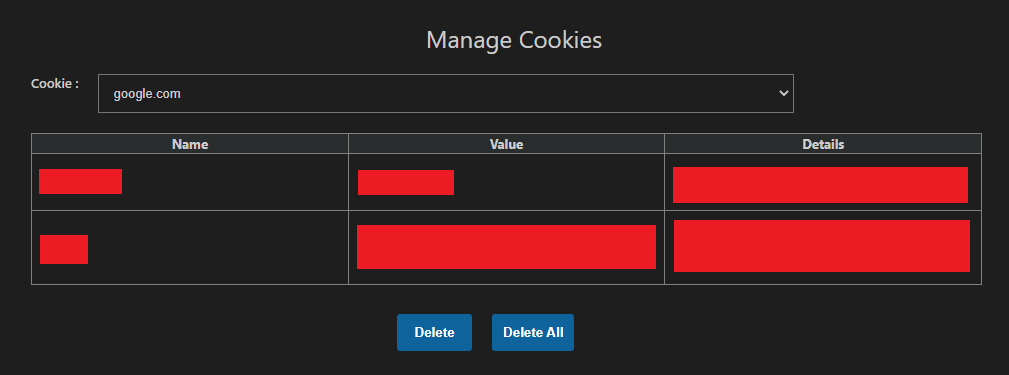
You can see all cookies that have been saved by the extension. This helps you understand what data is being stored and sent with your requests.
Delete Cookies
Remove specific cookies or clear all cookies at once. This is useful when you want to test your API with a fresh session or different authentication state.
Automatic Cookie Handling
Cookies are automatically included in your requests. When you receive a cookie in a response, Fetch Client saves it and adds it to future requests to the same domain. You don't need to copy and paste cookies manually.
Manual Cookie Override
If you need more control, you can manually edit cookies using the Cookie header in your request. This allows you to test specific scenarios or override automatic cookie handling.
🔧 How to Use
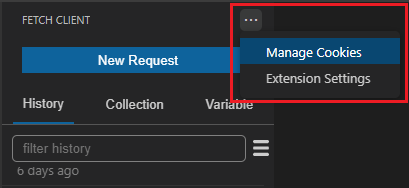
Access the cookie management features from the request menu:
💡 Tips
- Cookies are stored per domain, keeping your testing sessions organized
- Clear cookies between tests to ensure clean, repeatable results
- Use the Cookie header for testing edge cases or special scenarios