API Quality Gate
Analyse a single request, a folder, or an entire collection against 52 automated rules spanning 7 quality dimensions - Functional, Security, Performance, Design, Observability, Test Coverage, and Maintainability. Get a weighted 0-100 score, a PASS / CONDITIONAL PASS / FAIL verdict, a per-issue breakdown with concrete fixes, and a separate CI/CD gate status you can wire into a build pipeline.
📂 Opening the Quality Gate panel
| Entry point | Resulting scope |
|---|---|
| Right-click a Collection, Folder, or Request → Tools → API Quality Gate | Whole Collection / Folder (you choose which requests to include), or a single Request |
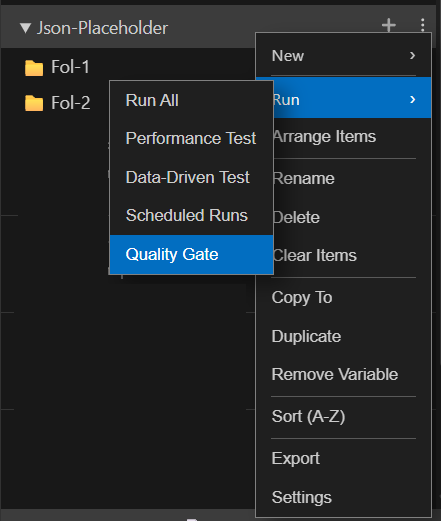
The panel opens with three tabs: Rules (choose which checks run), Requests (choose which requests are analysed - collection/folder scope only), and Result (the live report, populated once you run the gate).
📏 Rules tab
Every rule is listed, grouped by dimension, with a checkbox. Use it to permanently turn rules on/off for this workspace:
- Per-dimension header shows how many rules are currently selected (e.g. "9/13 selected") and gives Select All / Deselect All buttons for that dimension.
- Each rule row shows its name, description, and default severity badge.
- Selections are written to
.qgrc.jsonat the workspace root (disabledRules) as soon as you toggle a checkbox, and are picked up by every run for that workspace.
Note: disabling a rule here removes it from evaluation entirely - it produces no issue and isn't counted anywhere, including in exports. If you want a rule to still be evaluated and audited, use an inline @qg-disable tag instead (see Suppressing rules below).
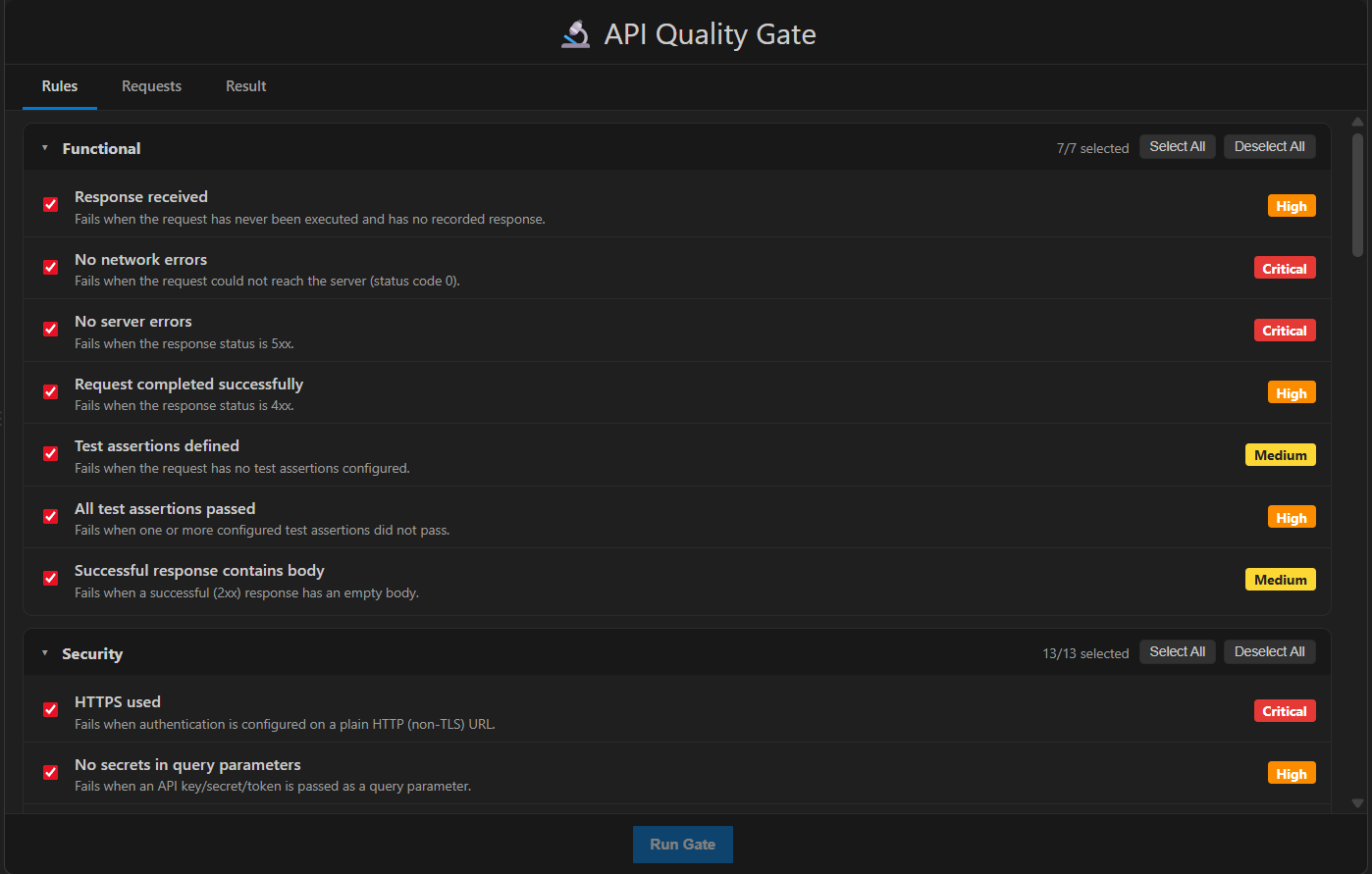
Expand Rules
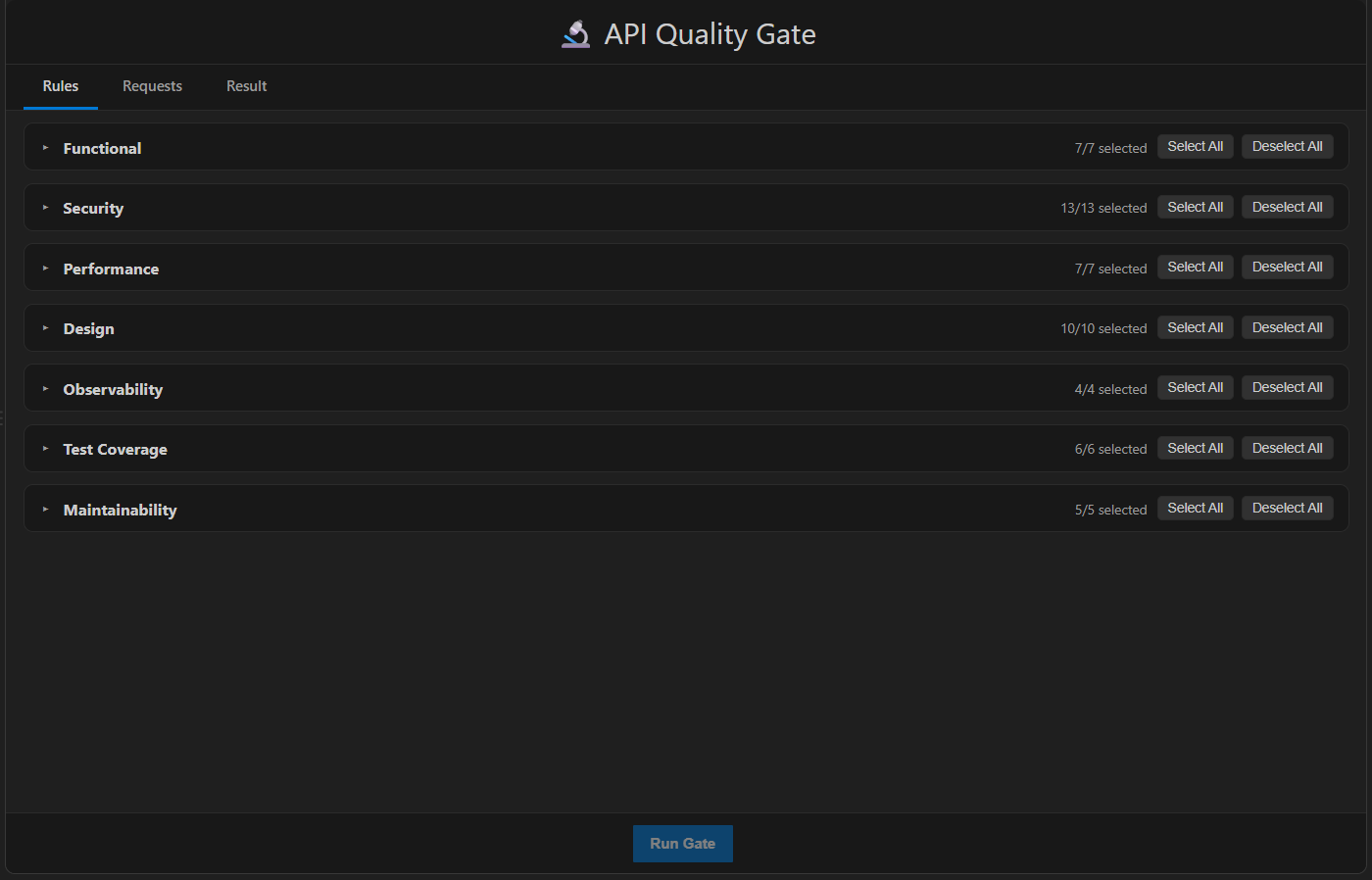
Collapse Rules
📋 Requests tab
- Single Request scope - this tab simply confirms that request will be analysed; there's nothing to select.
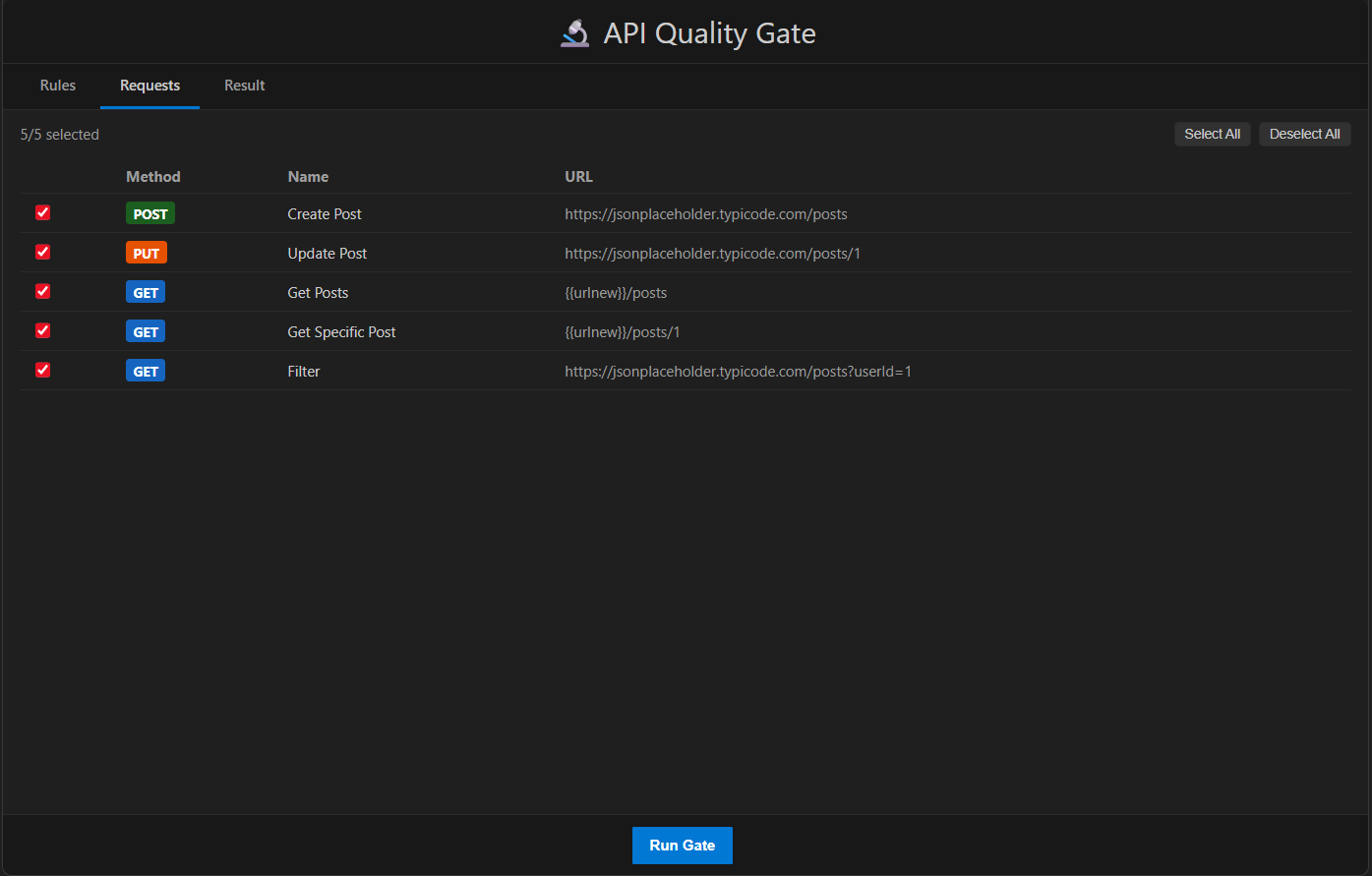
- Collection / Folder scope - a checkbox table lists every request in scope (method, name, URL). Use Select All / Deselect All, or check individual rows. Run Gate stays disabled until at least one request is selected.
📊 Result tab
- Go to the Rules tab and enable/disable checks as needed (optional - all rules run by default).
- Go to the Requests tab and confirm/select which requests to include (collection/folder scope only).
- Click Run Gate in the footer. You're switched to the Result tab automatically.
- While running, a spinner shows "Analysing API quality…".
- When finished, the aggregate banner, summary table, and per-request breakdown populate.
- Use the Export dropdown in the footer to save the report once it's available.
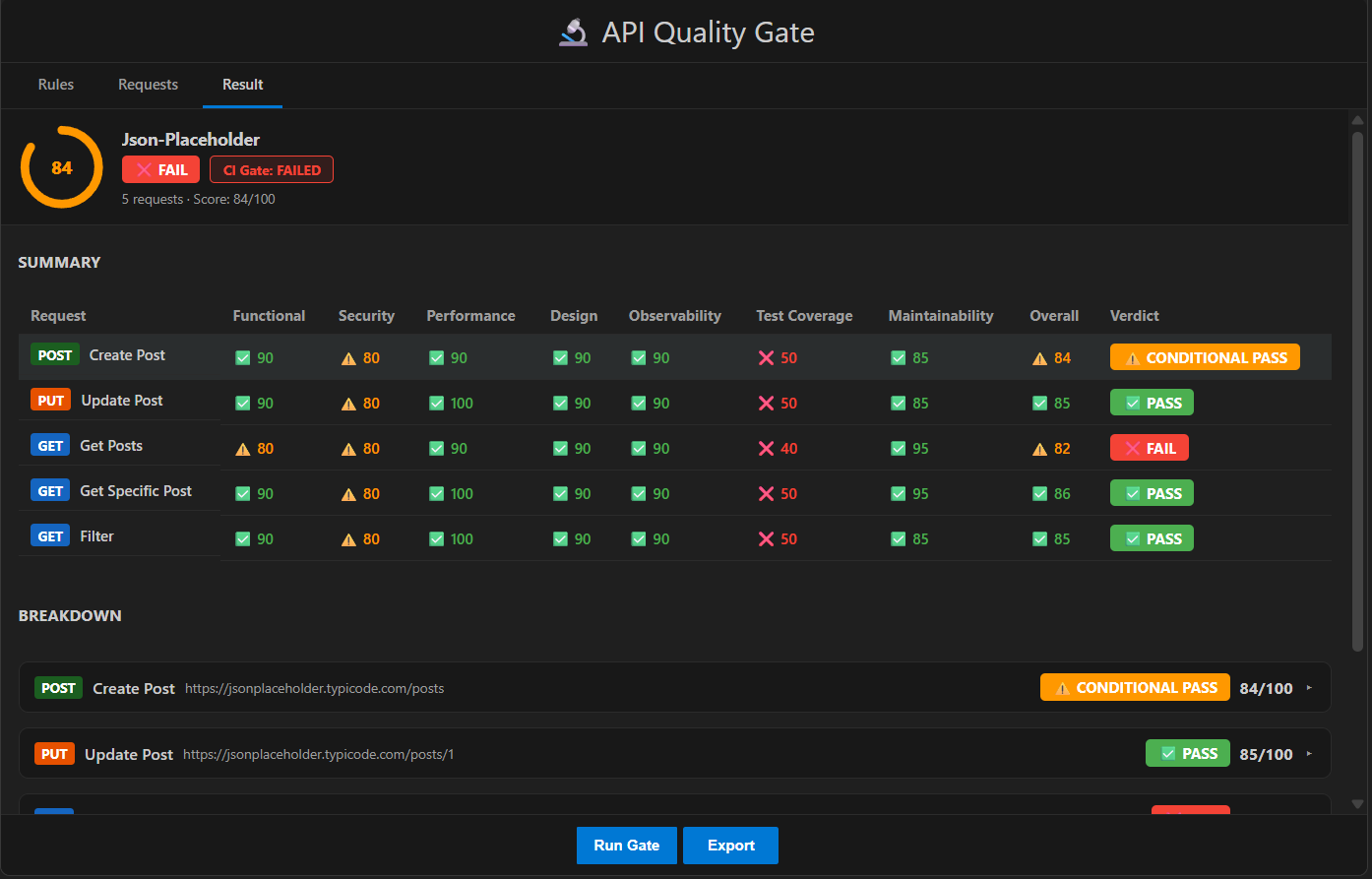
🧭 Aggregate banner
- A score ring shows the aggregate score (0-100), colour-coded: green ≥ 85, orange 70-84, red < 70.
- A verdict badge (✅ PASS / ⚠️ CONDITIONAL PASS / ❌ FAIL) for the whole run.
- A CI Gate badge (PASSED / FAILED) - hover it to see the specific reasons it failed, if any. This is independent of the verdict badge; see CI/CD gate status.
- Request count and aggregate score.
📋 Summary table
One row per request, one column per dimension, plus Overall and Verdict. Each score cell shows an icon and colour: ✅ green (≥ 85), ⚠️ orange (70-84), ❌ red (< 70) - so you can scan for weak spots across an entire collection at a glance.
🧩 Breakdown (per request)
Click a request to expand it:
- Severity pills - Critical / High / Medium / Low counts for that request.
- Dimension cards - one per dimension, each with its own score bar and issue count. Expand a card to see:
- The full list of issues, each with severity, description, and (click to expand) impact, recommendation, and a suggested fix where one applies.
- A Passed Rules / Failed Rules list, so you can see exactly which checks ran and which side of the line each landed on.
- A note when any issues were suppressed by an inline
@qg-disabletag, with a count.
🎯 The 7 quality dimensions
| Dimension | Default weight | What it evaluates |
|---|---|---|
| Functional | 0.20 | Whether the request actually works: reachable, no 4xx/5xx, has a response body, test assertions defined and passing |
| Security | 0.20 | Auth, secrets, headers, CORS, and leaked data - mapped to relevant OWASP API Security Top 10 items |
| Performance | 0.15 | Response time, payload size, caching, compression, pagination |
| Design | 0.15 | REST/URL conventions - casing, versioning, verbs, resource identifiers, content types, error shapes |
| Observability | 0.10 | Whether responses are debuggable - correlation IDs, content type, structured error messages/codes |
| Test Coverage | 0.10 | Whether the request has assertions covering status, body, headers, and timing, and whether they pass |
| Maintainability | 0.10 | Naming, documentation, and use of variables instead of hardcoded values/tokens |
Weights are configurable per workspace via .qgrc.json (see Configuration) and must sum to 1 for the overall score to stay on a 0-100 scale.
⚖️ Scoring model
Each failed rule deducts points from its dimension's score, based on the issue's severity:
| Severity | Deduction |
|---|---|
| Critical | -40 |
| High | -20 |
| Medium | -10 |
| Low | -5 |
A dimension's score is 100 - (sum of deductions for its issues), floored at 0. The overall score is the weighted average of all seven dimension scores, rounded to the nearest whole number.
🚦 Verdicts
| Verdict | Condition |
|---|---|
| ❌ FAIL | Any Critical-severity issue exists or overall score is below the conditional-pass threshold (default 70) |
| ⚠️ CONDITIONAL PASS | No Critical issues, and score is at or above 70 but below the pass threshold (default 85) |
| ✅ PASS | No Critical issues, and score is at or above 85 |
A single Critical issue always forces a FAIL, regardless of the overall score - this can't be overridden by weights.
For a collection/folder run, the aggregate verdict is computed the same way, using the average of every request's score and whether any request has a Critical issue.
🛑 CI/CD gate status
gateStatus is a separate pass/fail signal, independent of the PASS/CONDITIONAL PASS/FAIL verdict, meant for build pipelines:
| Field | Meaning |
|---|---|
passed | true/false |
exitCode | 0 if passed, 1 if not - use directly as a process exit code in CI scripts |
reasons | Human-readable list of what failed the gate |
By default the gate fails if there's more than 0 Critical issues across the whole report, or the aggregate score is below the conditional-pass threshold (70). Both are configurable via failOn in .qgrc.json:
failOn field | Default | Meaning |
|---|---|---|
critical | 0 | Max Critical issues allowed (report-wide) before the gate fails |
high | unlimited | Max High-severity issues allowed (report-wide) |
minScore | equal to thresholds.scoring.conditionalScore | Minimum aggregate score required |
🔇 Suppressing rules
There are two independent ways to turn a rule off, and they behave differently:
| Method | Where | Effect |
|---|---|---|
Rules tab checkbox / .qgrc.json → disabledRules | Workspace-wide, persistent | Rule is skipped entirely - not evaluated, no issue, nothing recorded, excluded from every export |
Inline @qg-disable tag | In a single request's Notes field | Rule is still evaluated. If it would have failed, the issue is recorded with suppressed: true - excluded from scoring and verdicts, but kept visible in the UI and exports for audit purposes |
Inline tag syntax (place anywhere in the request's Notes):
@qg-disable security/no-auth-mutation   // one specific rule
@qg-disable security                    // an entire dimension
@qg-disable *                           // every rule, for this request only
📚 Rule reference
Functional (7 rules)
| Rule | Default severity | Checks |
|---|---|---|
| Response received | High | The request has been run at least once and has a recorded response |
| No network errors | Critical | Status code isn't 0 / no connection error |
| No server errors | Critical | Status isn't 5xx |
| Request completed successfully | High | Status isn't 4xx |
| Test assertions defined | Medium | At least one test assertion is configured |
| All test assertions passed | High | No configured test assertion is currently failing |
| Successful response contains body | Medium | A 2xx (non-204/304) response on a non-HEAD/DELETE request isn't empty |
Security (13 rules)
| Rule | Default severity | Checks |
|---|---|---|
| HTTPS used | Critical | Auth isn't configured on a plain http:// URL |
| No secrets in query parameters | High | No API key/token/secret/password passed as a query param |
| No sensitive data in URL | Critical | No password/secret/token/credential keyword in the URL path |
| Authentication configured | High | POST/PUT/PATCH/DELETE (non-GraphQL) endpoints have auth configured |
| Bearer token uses variables | High | A configured Bearer token isn't a hardcoded value |
| Avoid Basic Authentication | Medium | Request doesn't use Basic Auth |
| Response contains x-content-type-options | Medium | Response includes X-Content-Type-Options: nosniff |
| Response contains x-frame-options | Medium | Response includes X-Frame-Options |
| Response contains strict-transport-security | Medium | Response includes HSTS header |
| No stack traces in response | High | Response body doesn't contain a stack-trace pattern |
| No sensitive secrets in response body | Critical | Body doesn't match AWS keys, JWTs, private keys, or secret/password fields |
| No CORS wildcard on mutations | Medium | Access-Control-Allow-Origin: * isn't used on a non-GET response |
| No CORS wildcard with credentials | Critical | Wildcard origin isn't combined with Access-Control-Allow-Credentials: true |
Performance (7 rules)
| Rule | Default severity | Checks |
|---|---|---|
| Response within timeout | Critical | Duration is below the timeout threshold (default 5000 ms) |
| Response time acceptable | Medium (escalates to High) | Duration is below the "slow" (500 ms) / "very slow" (2000 ms) thresholds |
| Payload size optimized | Medium (escalates to High) | Response size is below the warn (100 KB) / fail (1 MB) thresholds |
| Cache-Control configured | Medium | GET responses include Cache-Control |
| Conditional caching enabled | Low | GET responses include ETag or Last-Modified |
| Response compression enabled | Medium | GET responses over the compression threshold (10 KB) include Content-Encoding |
| Pagination implemented | Medium | List-style endpoints (/list, /all, /items, /results, /search) accept a pagination parameter |
Design (10 rules)
| Rule | Default severity | Checks |
|---|---|---|
| Lowercase URL path | Medium | Path contains no uppercase letters |
| Use hyphens instead of underscores | Low | Path segments don't use underscores |
| API versioning implemented | Medium | URL path or Api-Version header indicates a version |
| GET request has no body | High | GET requests don't send a body |
| GET endpoint is read-only | High | GET URLs don't contain mutation verbs (create/update/delete/…) |
| Resource-oriented URL naming | Medium | Path doesn't use verb-style segments (/getUser, …) |
| Clean resource URLs | Medium | URL has no technology-specific extension (.php, .asp, .jsp, …) |
| DELETE targets a specific resource | Medium | DELETE path includes a resource identifier |
| JSON request declares Content-Type | Medium | A JSON body is sent with a matching Content-Type header |
| Standard error response format | Low | Non-GraphQL 4xx/5xx bodies follow RFC 7807 or { code, message } |
Observability (4 rules)
| Rule | Default severity | Checks |
|---|---|---|
| Correlation ID returned | Medium | Response includes a correlation/trace header (X-Request-ID, X-Correlation-ID, traceparent, Request-ID) |
| Content-Type header returned | Medium | Response includes Content-Type |
| Error response includes message | Low | 4xx/5xx JSON bodies include message, error, or title |
| Error response includes code | Low | 4xx/5xx JSON bodies include code or errorCode |
Test Coverage (6 rules)
| Rule | Default severity | Checks |
|---|---|---|
| Tests defined | High | At least one test assertion is configured |
| Status code assertion | Medium | A "Response Code" assertion exists |
| Response body assertion | Medium | A body / JSON-body / custom assertion exists |
| Response time assertion | Low | A "Response Time" assertion exists |
| Response header assertion | Low | A "Response Header" assertion exists |
| All tests passed | Critical | No configured assertion is currently failing |
Maintainability (5 rules)
| Rule | Default severity | Checks |
|---|---|---|
| Request has a meaningful name | Medium | Request name isn't empty |
| Request contains documentation | Low | Notes/description field isn't empty |
| URL uses environment variables | Medium | URL contains at least one {{variable}} |
| Authentication uses variables | High | A configured Bearer token isn't hardcoded |
| No empty headers | Low | No enabled header has an empty key or value |
⚙️ Configuration (.qgrc.json)
Placed at the root of your workspace, this file is optional - every field falls back to a sensible default, and the Rules tab writes to it automatically when you toggle checkboxes.
{
  "thresholds": {
    "performance": {
      "slowMs": 500,
      "verySlowMs": 2000,
      "timeoutMs": 5000,
      "payloadWarnBytes": 102400,
      "payloadFailBytes": 1048576,
      "compressionThresholdBytes": 10240
    },
    "scoring": {
      "passScore": 85,
      "conditionalScore": 70
    }
  },
  "weights": {
    "Security": 0.3,
    "Functional": 0.2
  },
  "disabledRules": ["design/underscore-path"],
  "failOn": {
    "critical": 0,
    "high": 5,
    "minScore": 75
  }
}
| Setting | Default | Description |
|---|---|---|
thresholds.performance.slowMs | 500 | Response time (ms) above which a request is flagged Medium |
thresholds.performance.verySlowMs | 2000 | Response time (ms) above which a request is flagged High |
thresholds.performance.timeoutMs | 5000 | Response time (ms) above which a request is flagged Critical |
thresholds.performance.payloadWarnBytes | 102400 (100 KB) | Payload size above which a Medium warning is raised |
thresholds.performance.payloadFailBytes | 1048576 (1 MB) | Payload size above which a High warning is raised |
thresholds.performance.compressionThresholdBytes | 10240 (10 KB) | GET response size above which missing compression is flagged |
thresholds.scoring.passScore | 85 | Minimum overall score for a PASS verdict |
thresholds.scoring.conditionalScore | 70 | Minimum overall score to avoid FAIL |
weights | see dimensions table | Per-dimension weighting of the overall score - only override the dimensions you want to change; others keep their default |
disabledRules | [] | Rule ids, dimension names, or "*" to skip entirely (same as the Rules tab) |
failOn.critical | 0 | Max Critical issues allowed before the CI gate fails |
failOn.high | unlimited | Max High issues allowed before the CI gate fails |
failOn.minScore | equal to conditionalScore | Minimum aggregate score required for the CI gate to pass |
You don't need to include every field - only what you want to override.
🧪 How requests are evaluated
- If a request has a saved response (from a previous manual run), the gate analyses that response - nothing is re-executed.
- If a request has no saved response, it's run live as part of the gate, through a shared runner (
runLiveQualityGateRequest) that performs the full pipeline in one go:- Its configured pre-request chain runs first - collection/folder-level, then request-level (e.g. token setup) - and any variable updated by that chain is picked up before the main request fires.
- The main request fires directly, and only its own duration is measured and used for the Performance dimension.
- If the request has test assertions configured, they're executed against the live response and attached as
testResults- soFunctional → All test assertions passedand everyTest Coveragerule reflect the real, current outcome, not just whatever was last saved. - If the request has set-variable rules configured, they run against the live response, same as a normal manual Run.
This runner is shared between the extension's Quality Gate panel and the fc-cli qc command-line tool, so a live-evaluated request behaves identically - same pre-requests, same test execution, same variable updates - whichever surface triggers it.
📤 Exporting results
Once a report is available, use the Export dropdown in the footer:
| Format | Best for |
|---|---|
| JSON | A complete record of the run - config used, aggregate metrics, every dimension/rule/issue, and suppressed issues. Good for archiving or feeding into another tool. |
| CSV | Summary metrics in a spreadsheet-friendly format, for quick sharing or comparing runs. |
| HTML | A shareable, readable report you can open in a browser or send to teammates. |
| XML | A structured export for tools that expect XML. |
⚠️ Limitations
- The gate reflects the response as recorded or as observed from your machine during a live run - it isn't a substitute for server-side APM or a dedicated security scanner.
- Rules disabled via
.qgrc.json/ the Rules tab are skipped entirely and never appear in results or exports; only inline@qg-disabletags are tracked as suppressed issues. - A live-evaluated request that has set-variable rules will update your variable set as a side effect of running the gate, just like a normal manual Run would.
- Weights should sum to 1 to keep the overall score on a true 0-100 scale; the panel doesn't enforce this if you override them in
.qgrc.json.